
How do I: Enable immigration status reminders
Learn how to set up automated reminders for employee immigration status renewals to ensure compliance.
Overview
Immigration status reminders help ensure that employee visas and work permits are renewed on time, preventing compliance issues. You can configure automated reminders that notify administrators when immigration documents are approaching expiration.
Important
Immigration status reminders are a Pro feature. Ensure your organization has a Pro subscription
to access this feature.
Accessing Immigration Settings
To enable immigration status reminders:
- Navigate to Admin > Settings
- Click on the "Immigration Settings" tab
- Scroll to the "Reminders" section
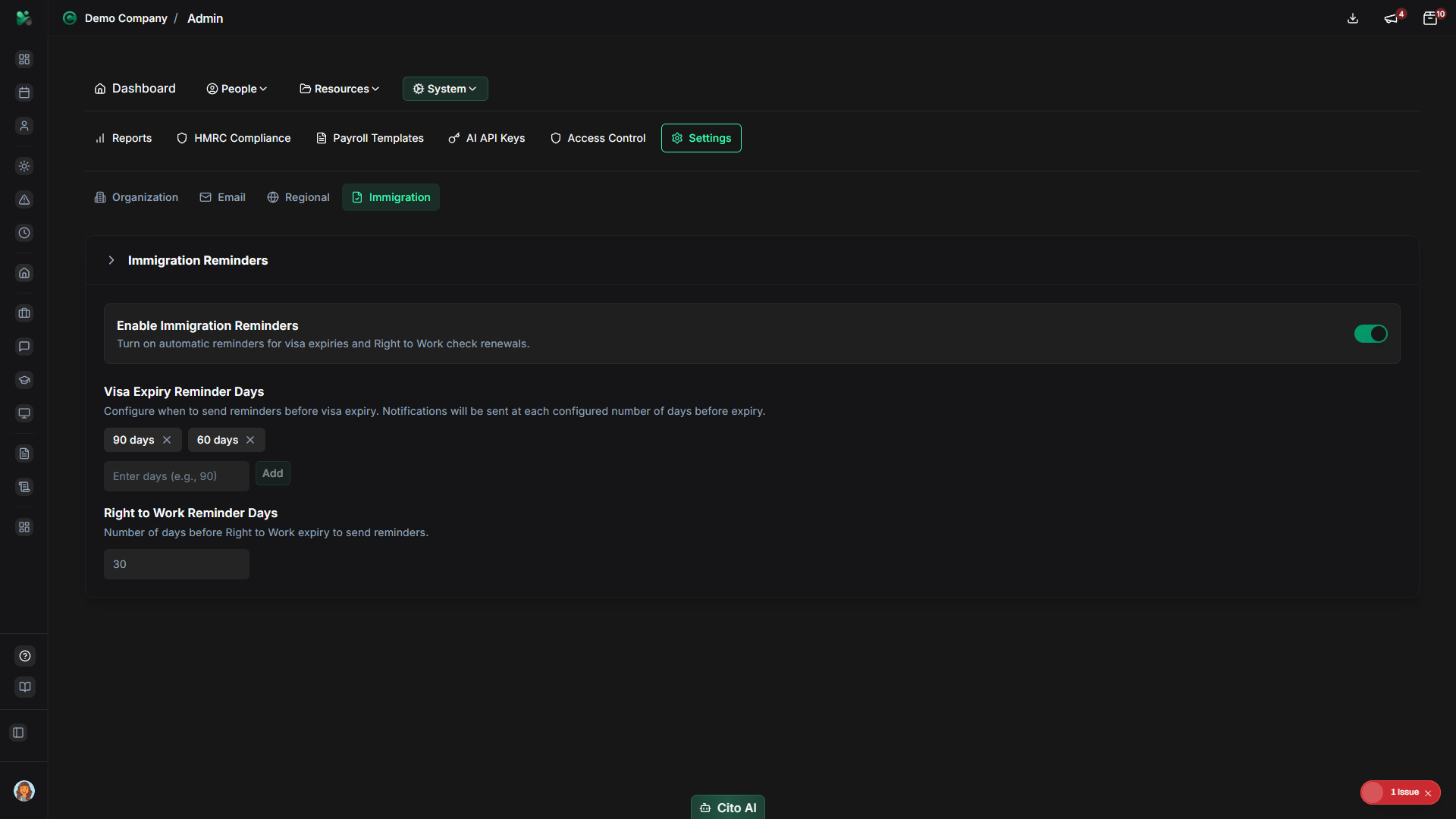
Enabling Reminders
To enable immigration status reminders:
- In the "Reminders" section, toggle "Enable Immigration Status Reminders" to ON
- Configure reminder timing:
- First reminder - How many days before expiration (e.g., 90 days)
- Second reminder - Additional reminder (e.g., 30 days)
- Final reminder - Urgent reminder (e.g., 7 days)
- Select who should receive reminders:
- HR Administrators
- Compliance Managers
- Employee's Manager
- Custom email addresses
- Click "Save Settings" to apply
Tip
We recommend setting the first reminder at least 90 days before expiration to allow sufficient time for
visa renewal processing.
Updating Employee Immigration Status
For reminders to work, you need to ensure employee immigration status is up to date:
- Navigate to Admin > Users
- Select the employee with immigration status
- Go to the "Employment" or "Personal" section
- Update immigration information:
- Visa type
- Visa number
- Expiration date
- Sponsorship status
- Save the changes
Viewing Upcoming Reminders
To see upcoming immigration status reminders:
- Navigate to Admin > HMRC Compliance
- Go to the "Sponsored Workers" section
- View the list of employees with upcoming visa expirations
- See the days remaining until expiration
- Filter by expiration date range or visa type
Email Notifications
When reminders are enabled, email notifications are automatically sent:
- At the configured reminder intervals (e.g., 90, 30, 7 days before expiration)
- To all selected recipients (HR, managers, etc.)
- Including employee details, visa information, and expiration date
- With links to update the immigration status
Warning
It's critical to track visa expiration dates and ensure timely renewals. Failure to maintain valid sponsorship
can result in serious compliance issues and penalties.
Related Documentation
- Admin: HMRC Compliance - Complete compliance guide
- Admin: Settings - Configure all system settings
- Admin: User Management - Update employee information