
Leave Management
Complete guide to managing leave requests, viewing balances, and handling approvals in CitoHR.
Overview
The Leave Management system allows employees to request time off, managers to approve or reject requests, and administrators to configure leave policies and balances. All leave requests are tracked and visible in the calendar.
Prerequisites
- Your account must be ACTIVE to create leave requests
- Leave approvers must be configured in your user profile (for employees)
- Leave policies must be set up by administrators
- You need MANAGER or ADMIN role to approve leave requests
Accessing Leave Management
- Log in to your CitoHR account
- Click on Leave in the main navigation menu
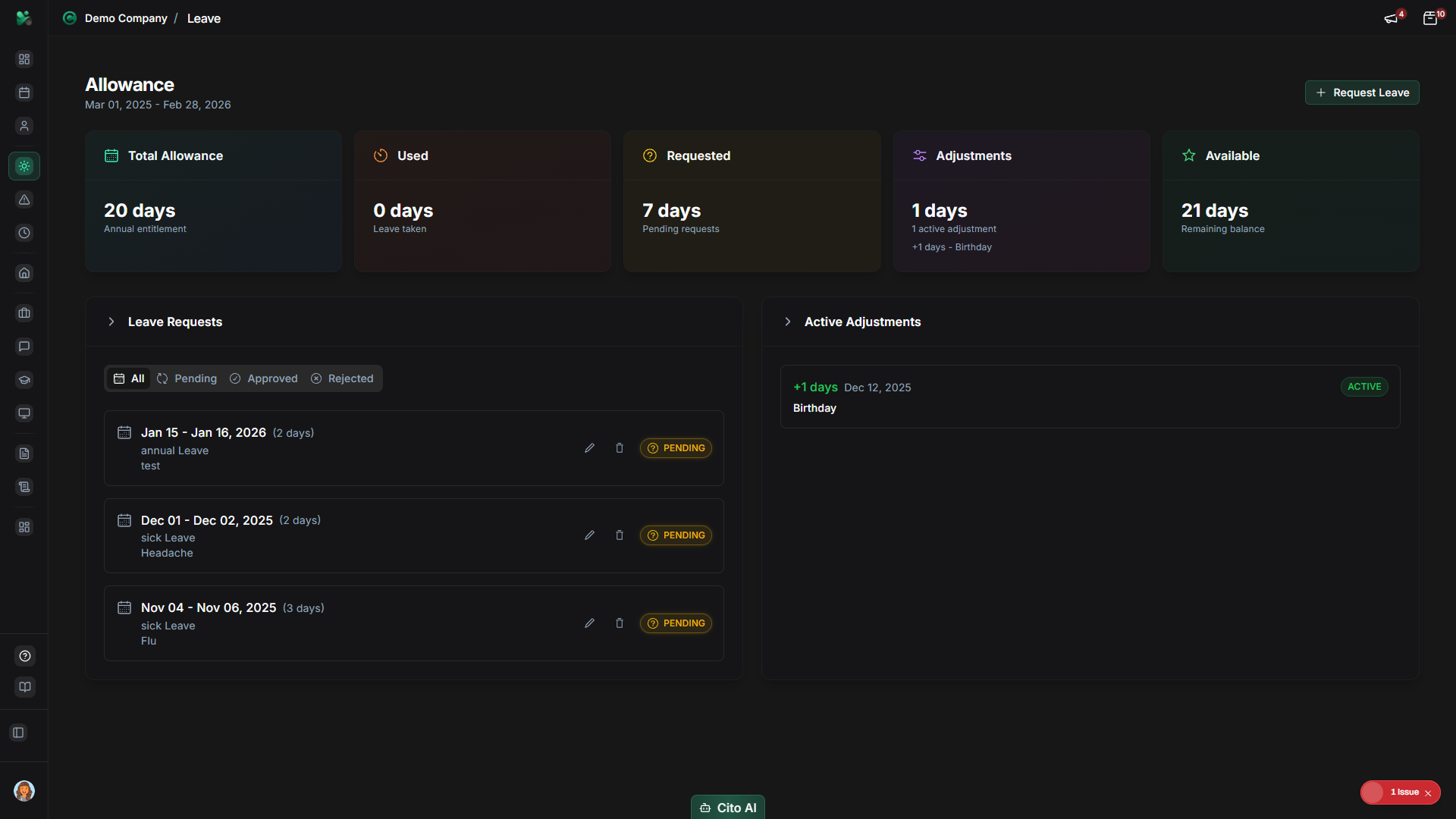
Creating a Leave Request
Request time off by following these steps:
- Navigate to the Leave page
- Click the "New Request" or "Request Leave" button
- Fill in the leave request form:
- Leave Type - Select from available types (Annual, Sick, Personal, etc.)
- Start Date - Choose the first day of leave
- End Date - Choose the last day of leave
- Duration - Automatically calculated based on dates
- Reason - Optional description for the leave request
- Review your leave balance to ensure you have enough days available
- Click "Submit Request"
Tip
Warning
Viewing Your Leave Balance
Check how many leave days you have available:
- Navigate to the Leave page
- Look at the Leave Balance section at the top of the page
- You'll see:
- Total Entitlement - Days allocated for the year
- Used - Days already taken
- Pending - Days in pending requests
- Available - Remaining days you can use
Note
Viewing Your Leave Requests
See all your leave requests and their status:
- On the Leave page, scroll to the "Your Requests" section
- You'll see a list of all your leave requests with:
- Request dates
- Leave type
- Duration (number of days)
- Status (Pending, Approved, Rejected, Cancelled)
- Click on a request to view more details
Cancelling a Leave Request
- Navigate to the Leave page
- Find the request you want to cancel in "Your Requests"
- Click on the request to open details
- Click the "Cancel Request" button
- Confirm the cancellation in the dialog
Note
Approving Leave Requests (Managers)
As a manager, approve or reject leave requests from your team:
- Navigate to the Leave page
- Look for the "Pending Approvals" section
- You'll see all leave requests waiting for your approval
- Click on a request to view details:
- Employee name
- Leave dates and duration
- Leave type
- Reason (if provided)
- Employee's current leave balance
- Click "Approve" or "Reject"
- If rejecting, optionally add a reason for the rejection
- Confirm your decision
Tip
Important
Viewing Team Leave (Managers)
See all leave requests from your team members:
- On the Leave page, scroll to the "Team Leave" section
- You'll see a calendar view or list of all team members' leave
- Filter by:
- Team member
- Leave type
- Status (Approved, Pending, etc.)
- Date range
Admin Leave Management
Administrators can manage all leave requests and configure leave policies:
- Navigate to Admin > Leave
- View all leave requests across the organization
- Filter by:
- Department
- Employee
- Status
- Date range
- Approve or reject any request
- Adjust leave balances if needed
- Configure leave policies and entitlements
Adjusting Leave Balance (Admin)
Administrators can manually adjust leave balances:
- Navigate to the user's profile (Admin > Users > Select User)
- Go to the "Leave" tab
- Scroll to the "Leave Balance" section
- Click "Adjust Balance"
- Enter the adjustment:
- Select leave type
- Enter number of days (positive to add, negative to subtract)
- Add a reason for the adjustment
- Click "Save Adjustment"
Important
Understanding Leave Types
Different types of leave may be available depending on your organization's policies:
- Annual Leave - Standard paid time off
- Sick Leave - For illness and medical appointments
- Personal Leave - Personal time off
- Bereavement - Time off for family loss
- Maternity/Paternity - Parental leave
- Unpaid Leave - Time off without pay
Note
Related Features
- Calendar - View all leave on the company calendar
- User Management - Configure leave approvers and settings
- Sickness - Report and manage sickness absences