Key takeaways
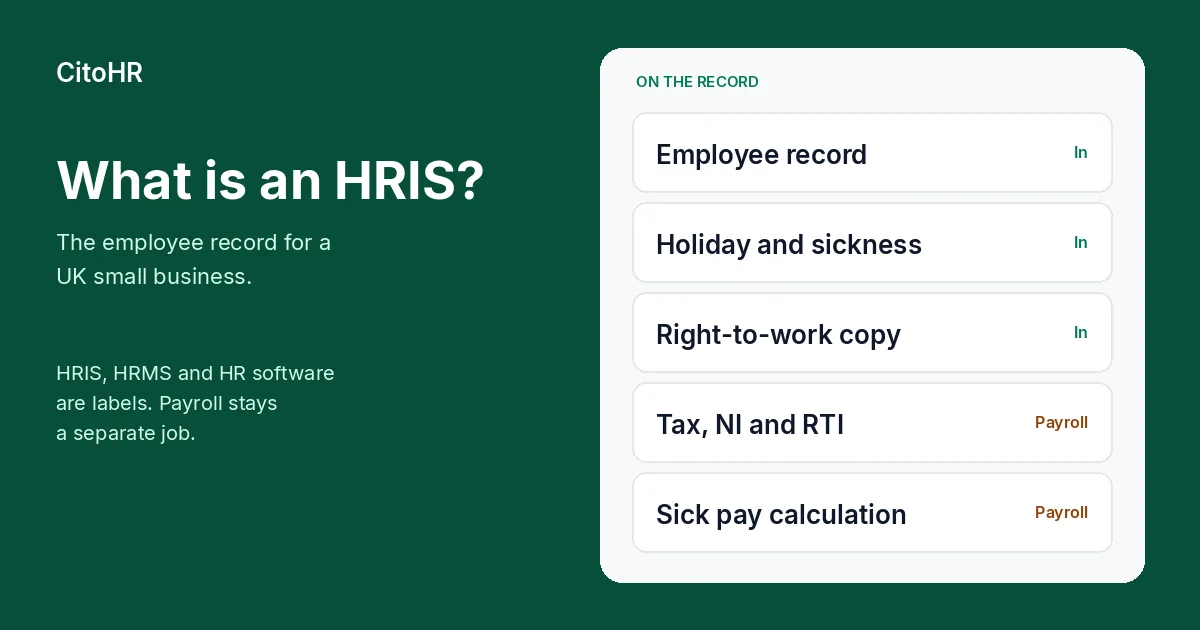
- An HRIS is the employee record: people, holiday and sickness, documents and policies. The letters stand for human resources information system.
- HRIS, HRMS, HCM and “HR software” are labels vendors use. UK law does not define them as separate products. A small UK employer is usually shopping for the same job under any of those names.
- The record a small UK business actually needs covers the person, time off, the right-to-work check and its date, and a restricted place for health and identity documents.
- Many products, including ours, do not run payroll. We store payroll fields and, on Pro, export them. We do not submit Real Time Information, and we do not calculate tax, National Insurance or statutory sick pay.
- UK law sets no headcount that forces you to buy an HRIS. In our view it earns its place once more than one person has to use the same record. Our Free plan covers up to 5 active employees. Pro is £3 per employee per month.
What is an HRIS?
An HRIS is the system that holds the facts about the people who work for you. A human resources information system is a structured employee record: name, job, start date, who they report to, how much holiday is left, and where the contract is filed.
For a UK small business that usually means one place instead of a spreadsheet, a shared inbox and a folder of scans. The HR software guide for UK SMEs sets out the jobs worth moving out of that pile. This article is the definition behind that guide: what the product is, what the acronyms mean, and which jobs stay outside it.
The name is descriptive. GOV.UK does not publish a specification called “HRIS”, and the Information Commissioner’s Office does not require you to buy one. The ICO’s guidance on collecting and keeping employment records says the UK GDPR and the Data Protection Act 2018 apply whenever you process workers’ personal information, whether that record is a filing cabinet or software. Read on 22 October 2026, that page says the guidance is under review because of the Data (Use and Access) Act and may change. The duties below are the ones it states now.
A useful HRIS answers ordinary questions without a hunt: who is off on Friday, when someone started, where the signed contract is, and when a time-limited right to work needs another check. It is a record with permissions. The Home Office check, the pay run and the management decision stay with you.
How do HRIS, HRMS, HCM and HR software differ?
They differ as marketing language, and they overlap in what you can buy. Treat the table as common UK usage, not as a standard.
| Name | What people usually mean | What a small UK team should hear |
|---|---|---|
| HRIS | Human resources information system. The employee database: records, absence, documents, the organisation chart. | The people record. Ask what is stored, who can see it, and how you get it out. |
| HRMS | Human resources management system. Often the same product, sometimes described with recruitment, performance or a payroll module attached. | Read the module list. The extra word does not mean payroll is included. |
| HCM | Human capital management. Usually a larger suite: workforce planning, talent, learning, and often payroll, aimed at bigger organisations. | More product than a five- or twenty-person team needs, unless you already run those processes. |
| HR software | The everyday UK phrase. It covers HRIS, HRMS and the lighter tools that do holiday and documents. | The phrase to use when you compare products for a small business. Our [UK HR software](/uk-hr-software) page is written in that sense. |
A vendor can call the same screen an HRIS on one page and HR software on the next. When a page says “all-in-one HRMS”, read whether it calculates pay and sends a Full Payment Submission to HMRC, or stores a salary and exports a spreadsheet. The comparison that matters is on the UK HR software page and in the HR software guide.
What does a small UK business actually need in one?
Five jobs cover what a small UK team usually needs from the record. Everything else can wait until you feel the gap.
The employee record. Name, job title, start date, contact details, emergency contact, and the manager. The ICO lists personnel files among the records employers keep, and data protection law applies to them. Keep the record adequate for the purpose and limited to what you need. Our employee records are that file.
Holiday and sickness. A shared calendar of who is off, a balance of holiday remaining, and a sickness record that is not mixed into the holiday pot. Sickness and injury records are on the ICO’s list of employment records, and health information is special-category data. The ICO says you need a lawful basis and a special-category condition under Article 9 of the UK GDPR, and you may also need a condition in Schedule 1 of the Data Protection Act 2018. Access should be limited to the people who need it. How a request and a sick day sit on the same person is on our leave and sickness page. The rate and the eligibility rules for statutory sick pay are a separate subject, covered in the statutory sick pay guide for 2026/27.
The right-to-work check. GOV.UK says you must check that a job applicant is allowed to work for you in the UK before you employ them. You check online with a share code where that route applies, or you check original documents. British and Irish citizens cannot use a share code for this, so their check is on the original document or through an identity service provider. You record the date of the check, and you keep copies during employment and for two years after the person stops working for you. If the right to work is time-limited, you check again when it is due to expire. GOV.UK says you could face a civil penalty if you employ an illegal worker and have not carried out a correct check. The current amount and the document lists are on that page.
An HRIS can store the check, the copy and the expiry date. It does not perform the check. The Home Office check is yours. Our immigration and visa tracking keeps the check on the employee, off the company directory. The step-by-step of the check itself is in the right to work guide.
Policies and the contract. The handbook, the expenses rule, and the signed contract need a home that is not one person’s laptop. Policy pages and acknowledgement are a product feature, not a substitute for reading the policy. Our policy management and document hub are those homes.
UK data protection, in how the record is used. The ICO says use of workers’ information has to be fair, lawful and transparent, and that you tell people what you hold and why. Consent is one lawful basis. The ICO says it is often difficult in employment, because you are in a position of power and consent is not freely given if the worker feels they cannot refuse. Rely on it when you can show a genuine choice. Otherwise identify a different lawful basis. Health information needs the extra condition described above. Data protection law sets no single retention period for every employment record. You keep information for as long as you need it, including where another law sets a period, then erase or anonymise it. The two-year right-to-work copy rule is one of those specific periods. It does not set the life of the whole personnel file. How we handle this in the product is on our GDPR page.
That is the core. Rotas, clock-in, onboarding workflows, recruitment and an AI assistant are useful later. They are not what makes the system an HRIS.
What does an HRIS not do?
Be specific here, because the sales language is vague.
It does not run payroll, unless the vendor shows that it does. Many systems, including ours, do not. GOV.UK’s introduction to PAYE says that if you run payroll yourself, your payroll software works out tax and National Insurance, and you report payments and deductions to HMRC on or before each payday. Running payroll describes the same job: record the pay, calculate deductions, produce payslips, and send a Full Payment Submission. That is payroll software, or an accountant or bureau who runs it.
We store payroll fields on the person, including salary, tax code and National Insurance number. On Pro, payroll export templates turn those fields into a file for your accountant or bureau. Those templates are not on Free. We do not run a pay run, submit Real Time Information, or calculate tax, National Insurance or statutory sick pay. Storing a salary is not operating PAYE. Our export options are the file. The pay run stays outside CitoHR.
It does not carry out the right-to-work check. It can hold the copy, the date and a reminder. The check, the share code and the decision that the document belongs to the person in front of you are the employer’s. A reminder before a visa date is a diary. It is not a Home Office decision, and it does not tell you that the permission covers the role.
It does not decide employment law questions. A Bradford factor prompt, a holiday balance or a policy acknowledgement is a record of what you entered. It is not a disciplinary outcome and it is not legal advice. When the question is whether someone qualifies for statutory sick pay, or which document is acceptable for a right-to-work check, use GOV.UK and, where you need advice on your facts, a qualified adviser.
It does not replace workplace pensions or Employers’ Liability insurance. Those duties sit with The Pensions Regulator and your insurer. An HRIS can note that a pension scheme exists. Enrolment and the insurance policy are separate.
It does not remove your data protection duties. Buying software does not choose your lawful basis, write your privacy information, or set your retention schedule. The ICO expects you to do those things. A system can make access control and deletion easier. The decision remains yours.
What should you put on a short requirements checklist?
Use this before you compare products. If a line does not matter this year, say so, and do not pay for it.
- People. Can you record the job, the start date, the manager and an emergency contact, and can you add a field you actually use?
- Who can see what. Can sickness, the right-to-work copy and pay sit off the company directory, visible to the people who need them?
- Holiday. Does it know your holiday year, the entitlement, and who approves a request?
- Sickness, kept apart from holiday. Can you record the absence without reducing the holiday balance, and can you pass the dates to whoever calculates statutory sick pay?
- Right to work. Can you store the check date, the copy, and a follow-up date when permission is time-limited? Does the product claim to “do the check”? If it does, read what that means.
- Documents and policies. Is there a place for the contract and the handbook, with access that matches the file?
- Getting data out. Can you export the employee list, leave and the payroll fields your accountant needs, in a file they can open? What happens to that export if you leave?
- Payroll, stated in one sentence. Either the product calculates tax and National Insurance and submits Real Time Information, or it does not. Write down which. “Payroll data” and “payroll” are not the same sentence.
- Leavers. Can you keep the right-to-work copy for the two years GOV.UK specifies, and delete or restrict the rest of the file when you no longer need it?
- Price at your headcount. Include every person the vendor counts, and read whether a free tier becomes a paid seat for the people who used to be free.
That list is our view of a sensible buying note for a UK team under a few dozen people. It is not a compliance audit.
What does an HRIS cost?
Quote a vendor’s own page, and date the quote. Prices move, and a “from” figure often excludes a module you need.
Our prices, as published on the pricing page:
- Free is £0 for up to 5 active employees. It includes employee records, leave and holiday, sickness, documents, policies, expenses, training, equipment, and immigration and visa records. It does not include payroll export templates or immigration expiry reminders.
- Pro is £3 per employee per month, charged for every employee on the account, including the first five. A team of 3 on Pro pays £9 a month. A team of 10 pays £30. There is a 14-day trial of Pro, and no card is taken to start it. When the trial ends you choose Pro, or Free if you have 5 or fewer active employees.
- Payroll export templates and immigration expiry reminders are on Pro. The underlying records, including visa documents, are on Free.
Free and Pro are separate plans. The first five people are free only while you stay on Free. Moving to Pro charges every seat.
Other UK products publish their own free plans, trials and monthly prices. We checked a set of them on 21 October 2026 for the free HR software guide. Use that article for those figures, and open the vendor’s page before you rely on one, because this article does not re-quote them. A permanent free plan and a 14-day trial are different offers. A trial ends. A free plan stays at £0 while you stay inside its limits.
Ignore any “average HRIS cost” you see without a source, a date and a headcount. A per-person price and a per-company price answer different questions. Multiply the per-person price by the people the vendor counts, then compare that total with a per-company price at the same headcount.
When does a small UK business need an HRIS?
This section is our view. It is not a statistic, and it is not a legal threshold.
One or two people. A careful spreadsheet, owned by one person, can still be the record. The risk is the only copy living in a personal inbox, and a right-to-work check with no date on it. If those two things are already under control, software can wait.
Around five people. This is where we think the record starts to pay for itself, and it happens to be where our Free plan stops. The reasons are practical: two people off on the same Friday, a second person who approves holiday, and a right-to-work copy that should not sit in one founder’s email. Five is our product limit on Free, not a number in UK employment law. A team of four with a clean spreadsheet has not broken a rule.
Beyond that. Once more than one person needs the same file, and a leaver’s right-to-work copy has to be found two years later, an HRIS is the simpler default in our view. Buy the employee record first. Add rotas, clock-in or recruitment when that work already happens every week in a second tool.
Payroll is a separate test. GOV.UK sets out when you must operate PAYE. Keep the people record and the pay run as two decisions.
Where should you start?
Mark the three checklist lines you will use this month. For most small UK teams those are the employee record, holiday and sickness, and the right-to-work file.
Our UK HR software page describes that record, and the pricing page is the Free plan and the £3 Pro price, with no card for the 14-day trial. The longer buying note is the HR software guide. Published free plans and trials are in the free HR software guide. The check itself is in the right to work guide.
Sources
Pages were read on 22 October 2026. If a live government or ICO page has changed, follow the live page. The ICO employment-records guidance says it is under review following the Data (Use and Access) Act.
- Collecting and keeping employment records, Information Commissioner’s Office
- Employment information, Information Commissioner’s Office, noting the final keeping-employment-records guidance published on 5 February 2025
- Checking a job applicant’s right to work, GOV.UK
- PAYE and payroll for employers, GOV.UK
- Running payroll, GOV.UK
- CitoHR pricing
- CitoHR and UK GDPR
Frequently asked questions
What is an HRIS?
An HRIS, a human resources information system, is the employee record for a business: who works here, holiday and sickness, documents and policies. In UK small-business use it is the HR database. The name is a vendor label, not a category in UK law, and it is not payroll.
What is the difference between an HRIS and an HRMS?
Vendors use HRIS, HRMS and HCM loosely. An HRIS usually means the employee record. An HRMS is often the same system described with more process, such as recruitment or performance. HCM usually means a larger suite. UK law does not define these names. HR software is the phrase most small UK employers search for, and it covers all of them.
Does an HRIS run payroll?
Many do not, including ours. We store payroll fields such as salary, tax code and National Insurance number, and on Pro we export them for an accountant or bureau. We do not run payroll, submit Real Time Information to HMRC, or calculate tax, National Insurance or statutory sick pay. GOV.UK describes that calculation and report as payroll software’s job.
Does a UK small business have to buy an HRIS?
No. UK law does not set a headcount that forces you to buy one. You still have to keep some records, including a right-to-work check before you employ someone and, where PAYE applies, payroll records. Those duties can be met with careful files. An HRIS is one way to keep the people record in one place.
What should a small UK employer keep in an HRIS?
Keep the employee record, holiday and sickness, the right-to-work check and its date, the contract and policies, and a clear rule for who can see each file. Sickness is information about health, which the ICO treats as special-category data, so access should be tighter than the company directory. Payroll calculation stays with payroll software or your accountant.